



Online Safety
Technology is changing at a fast pace. The Internet has opened up a whole new world. Whilst it brings with it many benefits, it also brings its dangers.
We have a responsibility as educators and parents to raise children's awareness of the benefits and dangers of the online world.
We teach Online Safety through a weekly session, through our PSHE lessons and it is reinforced in Computing lessons and whenever the children are accessing the internet.
We cover 8 topics over the course of the year:
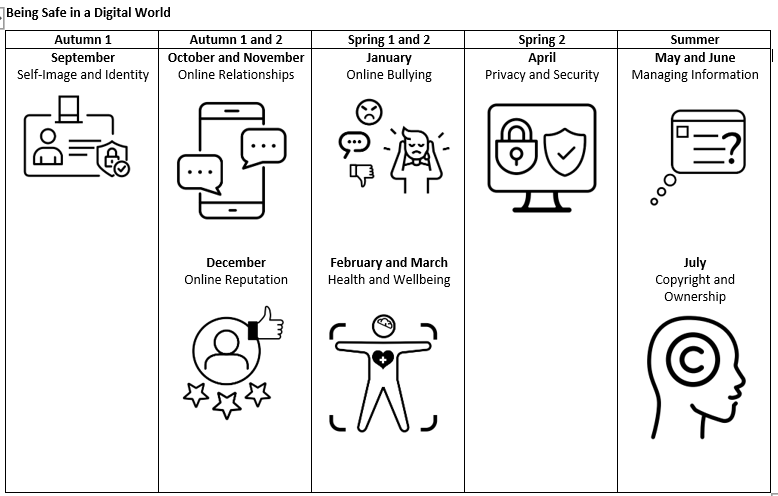
The objectives that are covered in each year group can be found in the documents below:
-
2BeSafe Parent Information Copyright and Ownership
download_for_offline
download_for_offline2BeSafe Parent Information Copyright and Ownership
- 2BeSafe Parent Information Online Reputation download_for_offline
download_for_offline2BeSafe Parent Information Online Reputation
- 2BeSafe Parent Information Privacy and Security download_for_offline
download_for_offline2BeSafe Parent Information Privacy and Security
- 2BeSafe Parent Information Self Image and Identity download_for_offline
download_for_offline2BeSafe Parent Information Self Image and Identity
- 2BeSafe Parent Information - Health Wellbeing and Lifestyle download_for_offline
download_for_offline2BeSafe Parent Information - Health Wellbeing and Lifestyle
- 2BeSafe Parent Information - Managing Online Information download_for_offline
download_for_offline2BeSafe Parent Information - Managing Online Information
- 2BeSafe Parent Information - Online Bullying download_for_offline
download_for_offline2BeSafe Parent Information - Online Bullying
- 2BeSafe Parent Information - Online Relationships download_for_offline
download_for_offline2BeSafe Parent Information - Online Relationships
Useful information for parents
Getting parents onboard is crucial. Greenmount Primary School is committed to providing as much information to parents as we possibly can.
Check out our weekly newsletters for up-to-date advice on online safety.
Top Tips for Parents:
- Explore the online world together
- Talk to your child about staying safe online
- Manage the software and tools your family use
- Agree rules about what’s OK and what’s not
Parental Controls
As parents and carers, you do all you can to help your children stay safe on the roads … do you take same care online ? Parental controls are a great tool to help protect your children online. There’s plenty of advice available to help you using them may not be as difficult as you first thought and there is help available.
This online tool helps you to understand how you can set parental controls on any device that can be used online.
internet matters | parental control guides
Are you a "sharent"?
Are you a ‘sharent’?
For many children online life begins before birth, when their excited parents-to be post ultrasound images on social media. According to research by Parent Zone, the average parent will share their child’s image online nearly 1000 times before their fifth birthday. As well as pictures, parents will share funny stories, information, or personal details, such as when their children’s birthdays are. Some parents even set up blogs or vlogs online in which they post stories, pictures and videos of their children as they grow, accessible to anyone who wishes to follow them.
So, what are the advantages and disadvantages to sharenting?
The internet can provide fantastic tools for allowing special moments from your child’s early years to be shared with family and friends. And online forums, networks and blogs often provide valuable support and reassurance for parents at a time when it’s easy to feel isolated or under pressure. But parental sharing can affect children as they grow up. No longer is the embarrassment of baby snaps restricted to digging out the photo album when you first meet your teen’s new boyfriend or girlfriend. Sharing photos and information online is permanent, and what can seem appropriate to share now may not be in the future.
So, what should you consider before you share? Who’s looking? When did you last check your privacy settings?
On most social networks the default is that any other service user can access your pictures, which may also appear in internet search results. Google your child’s name to review the information you post and the social networks you use. Remember that anyone who can see a photo can also download or screenshot it, and could go on to share it. What else are you sharing? You might be sharing more than what’s in the post. As default, many cameras, phones and apps tag posts and photos with ‘meta-data’ which can include location details and other identifying information. This is potentially risky for any child, but poses particular risks for vulnerable children such as those who have been fostered or adopted and could be sought online by members of their birth family.
Ownership Under the terms and conditions of most social networks, when you share a photo you license the network to use and reproduce your image, and grant it the right to license it for use by third parties. Your picture could then be used for commercial purposes and you may be surprised to know where it could end up - in extreme cases printed on a mug and sold on the internet! Your child’s digital tattoo Every publicly accessible image or comment featuring your child contributes to a public image which will follow them into the future. That apocalyptic nappy incident might make for a hilarious tweet now, but if it comes to light when they’re older, how could it affect the way they feel about themselves, or you, or how others see them? Could their online childhood become an issue if they are seeking a job, or a relationship, or even election to public office?
Taken from here.
Social Networking Sites
Parental advice on contacting social media sites
It’s so easy for young people to share online, that sometimes they might post something and wish that they hadn’t.
If your child has posted something that they regret online you should advise them to delete it from their account as quickly as they can.
What if someone else has posted something about your child?
Most websites provide an option for users to report to them to request removal of ‘content’ – such as videos, pictures, comments or profiles – that might be upsetting. Take screen shots of any upsetting content.
It’s important to know that making a report doesn’t mean the content will definitely be removed.
Most websites, including social media sites, have a set of rules - 'Terms of Use' - which they expect people using their site to obey. You or your child should check if any of the rules have been broken because websites will only take content down if this is the case.
YouTube Top Tips
There is no denying it children love YouTube. They can spend hours searching and watching their favourite videos, researching a school topic or creating their own videos and uploading them to share with family and friends. Unfortunately, not everything on YouTube is child friendly, and young people can come across some very inappropriate content including violence, videos, bad language and even bullying and trolls. The following top tips for parents were published by the South West Grid for Learning to help make YouTube that bit safer.
YouTube - 5 Top Tips for Parents
1. Create an account in Google that is used by the whole family so that you can see exactly which videos your children are watching, uploading and sharing.
2. Switch on “restricted mode” which will help you keep out some, but not all, of the inappropriate content you don’t want the children to see. You need to save this option and set it for every browser that you use. You also need to do this on each device you own.
3. Sit down with the children and go through the things that they like to watch. Most content will be attached to a channel and if you are happy with the content of the channel, you can subscribe to it. This may stop searches for other content.
4. If your children are making their own videos, make sure they are signed into the family account when they upload, and make sure they upload privately. Private means that only people you chose can view the video
5. The last tip is to disable the comments which prevents people from making inappropriate comments on any video uploaded by them.
How to Report a Concern
Has something happened online that has made your child feel worried or unsafe ?
Report it to one of CEOP’s Child Protection Advisors
CEOP (Child Exploitation and Online Protection) Centre is part of the National Crime Agency.
They can provide advice and support if your child has been affected by online bullying or abuse.
There are also many useful resources where parents can gain valuable advice and support. We have listed just a few:
- 2BeSafe Parent Information Online Reputation download_for_offline


